> ## Documentation Index
> Fetch the complete documentation index at: https://docs-dev-feat-3p-app-cross-app.mintlify.site/llms.txt
> Use this file to discover all available pages before exploring further.

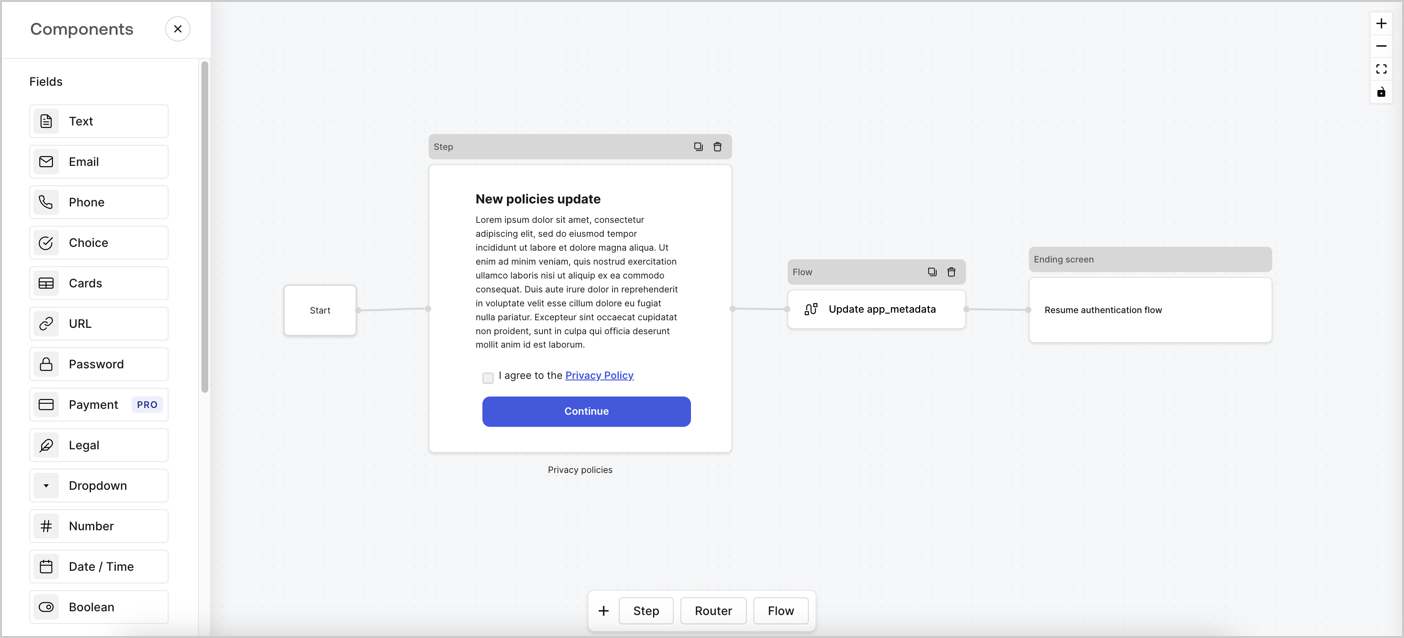
> Learn how to configure an update policy form using Forms for Actions for users to review and accept new terms of service or consent updates.

# Use Cases: Configure an update policy form using Forms

<Card title="Before you start">
  1. Create a [Machine-to-Machine Application](/docs/get-started/auth0-overview/create-applications/machine-to-machine-apps) with the following scopes enabled:

  * `read:users`
  * `update:users`
  * `create:users`
  * `read:users_app_metadata`
  * `update:users_app_metadata`
  * `create:users_app_metadata`

  2. Add a [Vault connection](/docs/customize/forms/vault) using the M2M application credentials.
</Card>

Forms for Actions allows you to create custom privacy policies flows and store the consent under the `app_metadata` object.
<Frame>
  <img src="https://mintcdn.com/docs-dev-feat-3p-app-cross-app/Ut5GOi8nj2Y7yf7V/docs/images/cdy7uua7fh8z/6i68dMvHDTijfRmSgN1x8Q/ad900e7d4c0fb34645921435472b8684/privavy-policy-form.png?fit=max&auto=format&n=Ut5GOi8nj2Y7yf7V&q=85&s=bc129ee09638e9cad5d9a3d2c2d585fc" alt="Dashboard > Actions > Forms > Privacy policy use case" data-og-width="1404" width="1404" data-og-height="638" height="638" data-path="docs/images/cdy7uua7fh8z/6i68dMvHDTijfRmSgN1x8Q/ad900e7d4c0fb34645921435472b8684/privavy-policy-form.png" data-optimize="true" data-opv="3" srcset="https://mintcdn.com/docs-dev-feat-3p-app-cross-app/Ut5GOi8nj2Y7yf7V/docs/images/cdy7uua7fh8z/6i68dMvHDTijfRmSgN1x8Q/ad900e7d4c0fb34645921435472b8684/privavy-policy-form.png?w=280&fit=max&auto=format&n=Ut5GOi8nj2Y7yf7V&q=85&s=49aa48885063a206c82f597f1e5fd6e5 280w, https://mintcdn.com/docs-dev-feat-3p-app-cross-app/Ut5GOi8nj2Y7yf7V/docs/images/cdy7uua7fh8z/6i68dMvHDTijfRmSgN1x8Q/ad900e7d4c0fb34645921435472b8684/privavy-policy-form.png?w=560&fit=max&auto=format&n=Ut5GOi8nj2Y7yf7V&q=85&s=18c59afd866abbb1211ff2f449bbbb80 560w, https://mintcdn.com/docs-dev-feat-3p-app-cross-app/Ut5GOi8nj2Y7yf7V/docs/images/cdy7uua7fh8z/6i68dMvHDTijfRmSgN1x8Q/ad900e7d4c0fb34645921435472b8684/privavy-policy-form.png?w=840&fit=max&auto=format&n=Ut5GOi8nj2Y7yf7V&q=85&s=a713bf8c35a9411dab12102f98dbc400 840w, https://mintcdn.com/docs-dev-feat-3p-app-cross-app/Ut5GOi8nj2Y7yf7V/docs/images/cdy7uua7fh8z/6i68dMvHDTijfRmSgN1x8Q/ad900e7d4c0fb34645921435472b8684/privavy-policy-form.png?w=1100&fit=max&auto=format&n=Ut5GOi8nj2Y7yf7V&q=85&s=7849be4321056956c08cc19d4ac50880 1100w, https://mintcdn.com/docs-dev-feat-3p-app-cross-app/Ut5GOi8nj2Y7yf7V/docs/images/cdy7uua7fh8z/6i68dMvHDTijfRmSgN1x8Q/ad900e7d4c0fb34645921435472b8684/privavy-policy-form.png?w=1650&fit=max&auto=format&n=Ut5GOi8nj2Y7yf7V&q=85&s=dcd58a34484e06f6f0f8c36af5ed6bf8 1650w, https://mintcdn.com/docs-dev-feat-3p-app-cross-app/Ut5GOi8nj2Y7yf7V/docs/images/cdy7uua7fh8z/6i68dMvHDTijfRmSgN1x8Q/ad900e7d4c0fb34645921435472b8684/privavy-policy-form.png?w=2500&fit=max&auto=format&n=Ut5GOi8nj2Y7yf7V&q=85&s=a0351c1f4a59ce537ef4ca96df8aef22 2500w" />
</Frame>

The sections below outline how you can create an Update Policy form using nodes and flows, along with steps for adding your form to a [Post Login](/docs/customize/actions/explore-triggers/signup-and-login-triggers/login-trigger) Action.

## Create a form from scratch

Follow these steps to create a form to gather information:

1. Open the Form editor by selecting **Auth0 Dashboard > Actions > Forms.**
2. Select **Create Form** > **Start from scratch**.

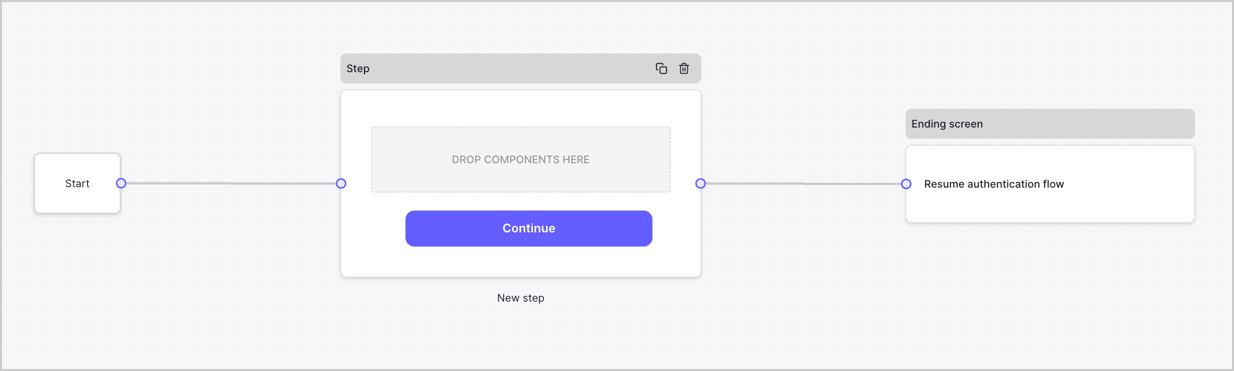
By default, a new form contains a Start node, a Step node, and an Ending screen node.
<Frame>
  <img src="https://mintcdn.com/docs-dev-feat-3p-app-cross-app/t0gEEBc-vF3EXTvr/docs/images/cdy7uua7fh8z/2TZ9jSjgEcARFpULI6hz4R/a4319a1bd482f2ee5cc23100fdb2f42c/New-form-Forms-for-action-use-case.png?fit=max&auto=format&n=t0gEEBc-vF3EXTvr&q=85&s=3f0c6813264fdb7510f1f9fd0ec155a3" alt="Dashboard > Forms > Use Cases > Form" data-og-width="1234" width="1234" data-og-height="371" height="371" data-path="docs/images/cdy7uua7fh8z/2TZ9jSjgEcARFpULI6hz4R/a4319a1bd482f2ee5cc23100fdb2f42c/New-form-Forms-for-action-use-case.png" data-optimize="true" data-opv="3" srcset="https://mintcdn.com/docs-dev-feat-3p-app-cross-app/t0gEEBc-vF3EXTvr/docs/images/cdy7uua7fh8z/2TZ9jSjgEcARFpULI6hz4R/a4319a1bd482f2ee5cc23100fdb2f42c/New-form-Forms-for-action-use-case.png?w=280&fit=max&auto=format&n=t0gEEBc-vF3EXTvr&q=85&s=29b853723fcc8cda8ea7a6dda8494a58 280w, https://mintcdn.com/docs-dev-feat-3p-app-cross-app/t0gEEBc-vF3EXTvr/docs/images/cdy7uua7fh8z/2TZ9jSjgEcARFpULI6hz4R/a4319a1bd482f2ee5cc23100fdb2f42c/New-form-Forms-for-action-use-case.png?w=560&fit=max&auto=format&n=t0gEEBc-vF3EXTvr&q=85&s=82b67e558846f10884c32e67d88dc2ed 560w, https://mintcdn.com/docs-dev-feat-3p-app-cross-app/t0gEEBc-vF3EXTvr/docs/images/cdy7uua7fh8z/2TZ9jSjgEcARFpULI6hz4R/a4319a1bd482f2ee5cc23100fdb2f42c/New-form-Forms-for-action-use-case.png?w=840&fit=max&auto=format&n=t0gEEBc-vF3EXTvr&q=85&s=40001d51febfbf8793a52ee6c7828707 840w, https://mintcdn.com/docs-dev-feat-3p-app-cross-app/t0gEEBc-vF3EXTvr/docs/images/cdy7uua7fh8z/2TZ9jSjgEcARFpULI6hz4R/a4319a1bd482f2ee5cc23100fdb2f42c/New-form-Forms-for-action-use-case.png?w=1100&fit=max&auto=format&n=t0gEEBc-vF3EXTvr&q=85&s=71cac94a26ace0413b457fa1efc3f728 1100w, https://mintcdn.com/docs-dev-feat-3p-app-cross-app/t0gEEBc-vF3EXTvr/docs/images/cdy7uua7fh8z/2TZ9jSjgEcARFpULI6hz4R/a4319a1bd482f2ee5cc23100fdb2f42c/New-form-Forms-for-action-use-case.png?w=1650&fit=max&auto=format&n=t0gEEBc-vF3EXTvr&q=85&s=414ed388bb1c5e7de5311c9d9dfa2b1d 1650w, https://mintcdn.com/docs-dev-feat-3p-app-cross-app/t0gEEBc-vF3EXTvr/docs/images/cdy7uua7fh8z/2TZ9jSjgEcARFpULI6hz4R/a4319a1bd482f2ee5cc23100fdb2f42c/New-form-Forms-for-action-use-case.png?w=2500&fit=max&auto=format&n=t0gEEBc-vF3EXTvr&q=85&s=4b79a5b97bde2c3e6032b7b998144e75 2500w" />
</Frame>

### Configure the Step node

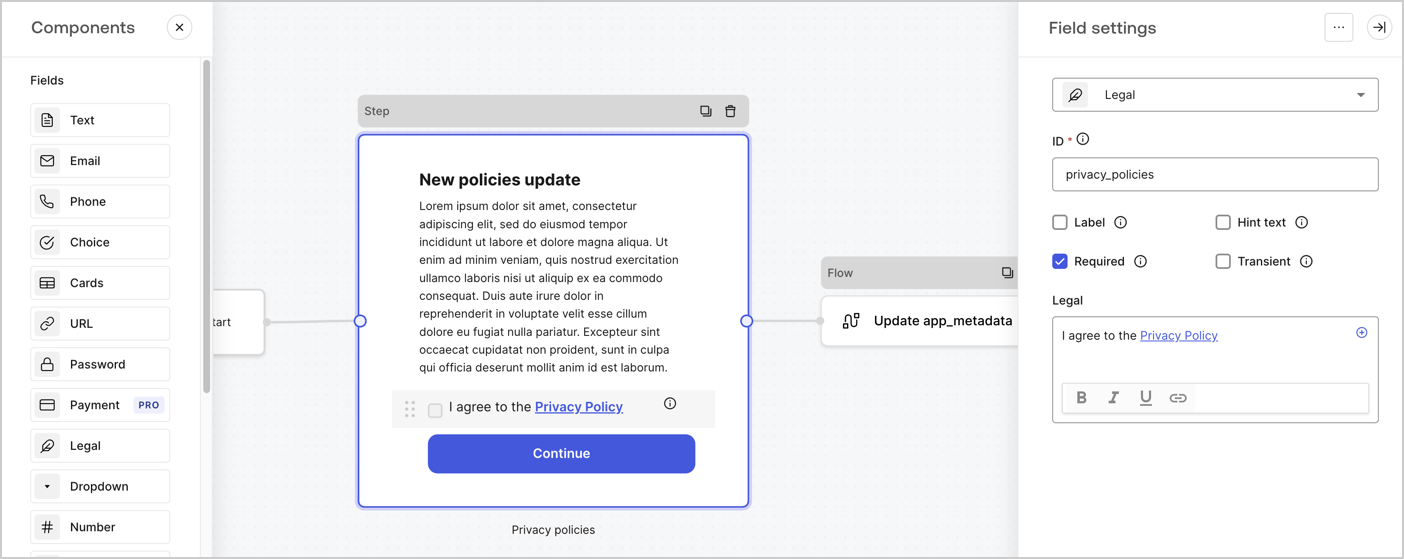
The Step node is the graphical interface visible to users. Add [Fields](/docs/customize/forms/nodes-and-components) to the Step node to collect the new agreement acceptance value by following these steps:

1. Drag a **Rich text** field from the **Components menu** into the **Step** node.

   * **Rich text**: Enter a description of your privacy policies updates.
   * Select **Save**.
2. Drag a **Legal** field into the **Step** node.

   * **ID**: Enter `privacy_policies`.
   * **Required**: Enable the checkbox.
   * **Legal**: Enter `I agree to the Privacy Policy`.
   * Select **Save**.
3. Select **Publish** to save.
<Frame>
  <img src="https://mintcdn.com/docs-dev-feat-3p-app-cross-app/cDs5cWzqgA92geHT/docs/images/cdy7uua7fh8z/59zFFjQjAnjogkc2QGIqqJ/0ad66b1b636544122aa4e65968b76c2c/privacy-policy-step-node.png?fit=max&auto=format&n=cDs5cWzqgA92geHT&q=85&s=2312252bb0678173145445799495c1c8" alt="Dashboard > Actions > Forms > Use case privacy policy step node" data-og-width="1404" width="1404" data-og-height="559" height="559" data-path="docs/images/cdy7uua7fh8z/59zFFjQjAnjogkc2QGIqqJ/0ad66b1b636544122aa4e65968b76c2c/privacy-policy-step-node.png" data-optimize="true" data-opv="3" srcset="https://mintcdn.com/docs-dev-feat-3p-app-cross-app/cDs5cWzqgA92geHT/docs/images/cdy7uua7fh8z/59zFFjQjAnjogkc2QGIqqJ/0ad66b1b636544122aa4e65968b76c2c/privacy-policy-step-node.png?w=280&fit=max&auto=format&n=cDs5cWzqgA92geHT&q=85&s=cca4a6526cc35910cc199439deba8891 280w, https://mintcdn.com/docs-dev-feat-3p-app-cross-app/cDs5cWzqgA92geHT/docs/images/cdy7uua7fh8z/59zFFjQjAnjogkc2QGIqqJ/0ad66b1b636544122aa4e65968b76c2c/privacy-policy-step-node.png?w=560&fit=max&auto=format&n=cDs5cWzqgA92geHT&q=85&s=a43ffce1933f07692498474b349c0be9 560w, https://mintcdn.com/docs-dev-feat-3p-app-cross-app/cDs5cWzqgA92geHT/docs/images/cdy7uua7fh8z/59zFFjQjAnjogkc2QGIqqJ/0ad66b1b636544122aa4e65968b76c2c/privacy-policy-step-node.png?w=840&fit=max&auto=format&n=cDs5cWzqgA92geHT&q=85&s=8938c2db2a4b248edb0dfb0903a22927 840w, https://mintcdn.com/docs-dev-feat-3p-app-cross-app/cDs5cWzqgA92geHT/docs/images/cdy7uua7fh8z/59zFFjQjAnjogkc2QGIqqJ/0ad66b1b636544122aa4e65968b76c2c/privacy-policy-step-node.png?w=1100&fit=max&auto=format&n=cDs5cWzqgA92geHT&q=85&s=434b88453a40954fce6b6430f0452400 1100w, https://mintcdn.com/docs-dev-feat-3p-app-cross-app/cDs5cWzqgA92geHT/docs/images/cdy7uua7fh8z/59zFFjQjAnjogkc2QGIqqJ/0ad66b1b636544122aa4e65968b76c2c/privacy-policy-step-node.png?w=1650&fit=max&auto=format&n=cDs5cWzqgA92geHT&q=85&s=0e5b9a57fb3c233df97a931d3565892f 1650w, https://mintcdn.com/docs-dev-feat-3p-app-cross-app/cDs5cWzqgA92geHT/docs/images/cdy7uua7fh8z/59zFFjQjAnjogkc2QGIqqJ/0ad66b1b636544122aa4e65968b76c2c/privacy-policy-step-node.png?w=2500&fit=max&auto=format&n=cDs5cWzqgA92geHT&q=85&s=69ace01b89e284a2c4398e57119172df 2500w" />
</Frame>

### Configure the Flow node

Add a **Flow** node after the **Step** node to update the `app_metadata` and resume the authentication flow by following these steps:

1. Select **Flow** from the bottom of the Form editor.
2. Remove the existing link between the **Step** and **Ending Screen** nodes.
3. Select the new **Flow** > **Click to add a flow** > **Create a new flow.**

   * Enter `Update app_metadata` in the **Name** field.
   * Select **Create**.
   * Select **Save**.
4. Link the **Flow** node to the **Step** and **Ending Screen** nodes as pictured below.
5. Select **Publish** to save.

<Frame>
  <img src="https://mintcdn.com/docs-dev-feat-3p-app-cross-app/Ut5GOi8nj2Y7yf7V/docs/images/cdy7uua7fh8z/6YIkzm7SrpM9LW76AXuRzh/353c518fe82bbaa440836da1d83596d6/link-policies.png?fit=max&auto=format&n=Ut5GOi8nj2Y7yf7V&q=85&s=0bfdcc4acc396e8a3c0e301c3038af60" alt="Dashboard > Actions > Forms > Form" data-og-width="1404" width="1404" data-og-height="599" height="599" data-path="docs/images/cdy7uua7fh8z/6YIkzm7SrpM9LW76AXuRzh/353c518fe82bbaa440836da1d83596d6/link-policies.png" data-optimize="true" data-opv="3" srcset="https://mintcdn.com/docs-dev-feat-3p-app-cross-app/Ut5GOi8nj2Y7yf7V/docs/images/cdy7uua7fh8z/6YIkzm7SrpM9LW76AXuRzh/353c518fe82bbaa440836da1d83596d6/link-policies.png?w=280&fit=max&auto=format&n=Ut5GOi8nj2Y7yf7V&q=85&s=a2b5e9428d4172f2515e107c0650eaa2 280w, https://mintcdn.com/docs-dev-feat-3p-app-cross-app/Ut5GOi8nj2Y7yf7V/docs/images/cdy7uua7fh8z/6YIkzm7SrpM9LW76AXuRzh/353c518fe82bbaa440836da1d83596d6/link-policies.png?w=560&fit=max&auto=format&n=Ut5GOi8nj2Y7yf7V&q=85&s=6b53494e512e05ecaa1a03be8375edb5 560w, https://mintcdn.com/docs-dev-feat-3p-app-cross-app/Ut5GOi8nj2Y7yf7V/docs/images/cdy7uua7fh8z/6YIkzm7SrpM9LW76AXuRzh/353c518fe82bbaa440836da1d83596d6/link-policies.png?w=840&fit=max&auto=format&n=Ut5GOi8nj2Y7yf7V&q=85&s=ff98ee46e0e7f7a86b2ec940e98bb5cf 840w, https://mintcdn.com/docs-dev-feat-3p-app-cross-app/Ut5GOi8nj2Y7yf7V/docs/images/cdy7uua7fh8z/6YIkzm7SrpM9LW76AXuRzh/353c518fe82bbaa440836da1d83596d6/link-policies.png?w=1100&fit=max&auto=format&n=Ut5GOi8nj2Y7yf7V&q=85&s=cfff3377d1228f489a300d99fef831cb 1100w, https://mintcdn.com/docs-dev-feat-3p-app-cross-app/Ut5GOi8nj2Y7yf7V/docs/images/cdy7uua7fh8z/6YIkzm7SrpM9LW76AXuRzh/353c518fe82bbaa440836da1d83596d6/link-policies.png?w=1650&fit=max&auto=format&n=Ut5GOi8nj2Y7yf7V&q=85&s=4e70f28449d482d4ad0808e8876d2f22 1650w, https://mintcdn.com/docs-dev-feat-3p-app-cross-app/Ut5GOi8nj2Y7yf7V/docs/images/cdy7uua7fh8z/6YIkzm7SrpM9LW76AXuRzh/353c518fe82bbaa440836da1d83596d6/link-policies.png?w=2500&fit=max&auto=format&n=Ut5GOi8nj2Y7yf7V&q=85&s=425034ec4c1a149a97db6ab07a20cc00 2500w" />
</Frame>

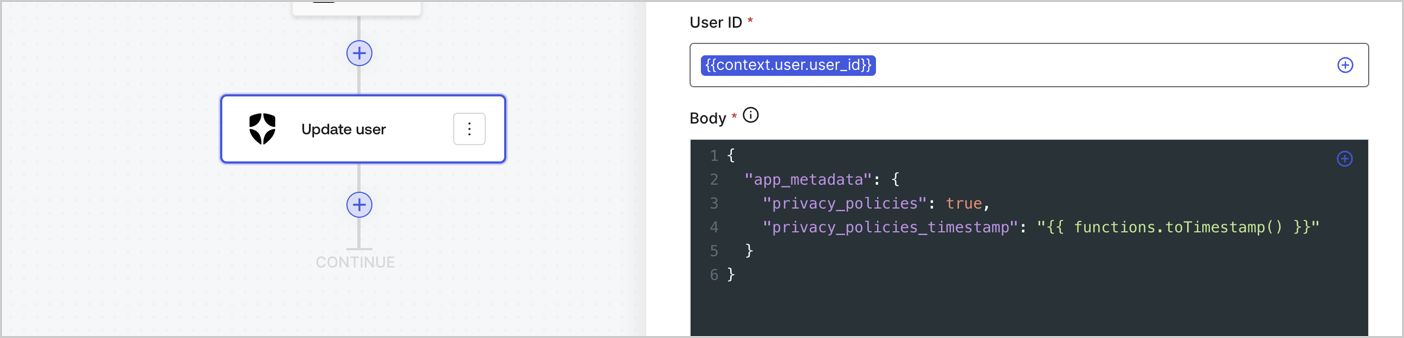
Add an Auth0 Update user action to the flow by following these steps:

1. Select the **Flow** **Update app\_metadata** > **Edit flow** to open the Flow editor in a new tab.
2. Below the StartAction, select the **+** icon to add an **Update user** action. Complete the fields below, then select **Save** to continue.

   * **Connection**: Select from the dropdown the Vault connection to your M2M application.

   * **User ID**: Enter `{{context.user.user_id}}`.

   * **Body**: Copy and paste the following code to update the app\_metadata with the privacy\_policies and privacy\_policies\_timestamp properties.

     ```text lines theme={null}
     {
       "app_metadata": {
         "privacy_policies": true,
         "privacy_policies_timestamp": "{{ functions.toTimestamp() }}"
       }
     }
     ```

   * Select **Save**.
3. Select **Publish** to save.
<Frame>
  <img src="https://mintcdn.com/docs-dev-feat-3p-app-cross-app/MqhhvvxYSG4Oyd6q/docs/images/cdy7uua7fh8z/CvMNIwWrOUwaFW4X3G28p/1fb70ae57a20749d9ffaaba8dc0b7e26/update-user-privacy.png?fit=max&auto=format&n=MqhhvvxYSG4Oyd6q&q=85&s=9cd76519181c8b5226335c07072a55d6" alt="Dashboard > Actions > Forms > User case privacy policy code" data-og-width="1404" width="1404" data-og-height="338" height="338" data-path="docs/images/cdy7uua7fh8z/CvMNIwWrOUwaFW4X3G28p/1fb70ae57a20749d9ffaaba8dc0b7e26/update-user-privacy.png" data-optimize="true" data-opv="3" srcset="https://mintcdn.com/docs-dev-feat-3p-app-cross-app/MqhhvvxYSG4Oyd6q/docs/images/cdy7uua7fh8z/CvMNIwWrOUwaFW4X3G28p/1fb70ae57a20749d9ffaaba8dc0b7e26/update-user-privacy.png?w=280&fit=max&auto=format&n=MqhhvvxYSG4Oyd6q&q=85&s=0729e03bb7d84ccc5623810cb543aab8 280w, https://mintcdn.com/docs-dev-feat-3p-app-cross-app/MqhhvvxYSG4Oyd6q/docs/images/cdy7uua7fh8z/CvMNIwWrOUwaFW4X3G28p/1fb70ae57a20749d9ffaaba8dc0b7e26/update-user-privacy.png?w=560&fit=max&auto=format&n=MqhhvvxYSG4Oyd6q&q=85&s=02890e4281a311823ec8c12ae1f66e22 560w, https://mintcdn.com/docs-dev-feat-3p-app-cross-app/MqhhvvxYSG4Oyd6q/docs/images/cdy7uua7fh8z/CvMNIwWrOUwaFW4X3G28p/1fb70ae57a20749d9ffaaba8dc0b7e26/update-user-privacy.png?w=840&fit=max&auto=format&n=MqhhvvxYSG4Oyd6q&q=85&s=0e5d0aef6cc62a4681fd547de8e63b14 840w, https://mintcdn.com/docs-dev-feat-3p-app-cross-app/MqhhvvxYSG4Oyd6q/docs/images/cdy7uua7fh8z/CvMNIwWrOUwaFW4X3G28p/1fb70ae57a20749d9ffaaba8dc0b7e26/update-user-privacy.png?w=1100&fit=max&auto=format&n=MqhhvvxYSG4Oyd6q&q=85&s=adef4f1c098fc8a50d059616bdb5d6c6 1100w, https://mintcdn.com/docs-dev-feat-3p-app-cross-app/MqhhvvxYSG4Oyd6q/docs/images/cdy7uua7fh8z/CvMNIwWrOUwaFW4X3G28p/1fb70ae57a20749d9ffaaba8dc0b7e26/update-user-privacy.png?w=1650&fit=max&auto=format&n=MqhhvvxYSG4Oyd6q&q=85&s=c66d5f293eedd50790175f44b4339807 1650w, https://mintcdn.com/docs-dev-feat-3p-app-cross-app/MqhhvvxYSG4Oyd6q/docs/images/cdy7uua7fh8z/CvMNIwWrOUwaFW4X3G28p/1fb70ae57a20749d9ffaaba8dc0b7e26/update-user-privacy.png?w=2500&fit=max&auto=format&n=MqhhvvxYSG4Oyd6q&q=85&s=555554ae0ea1bcf548749be7d5b43349 2500w" />
</Frame>

<Callout icon="file-lines" color="#0EA5E9" iconType="regular">
  The flow **Update app\_metadata** adds a `privacy_policies true` value to the app`_metadata` object and also generates a timestamp with a [helper function.](/docs/customize/forms/variables)
</Callout>

## Retrieve the form render code

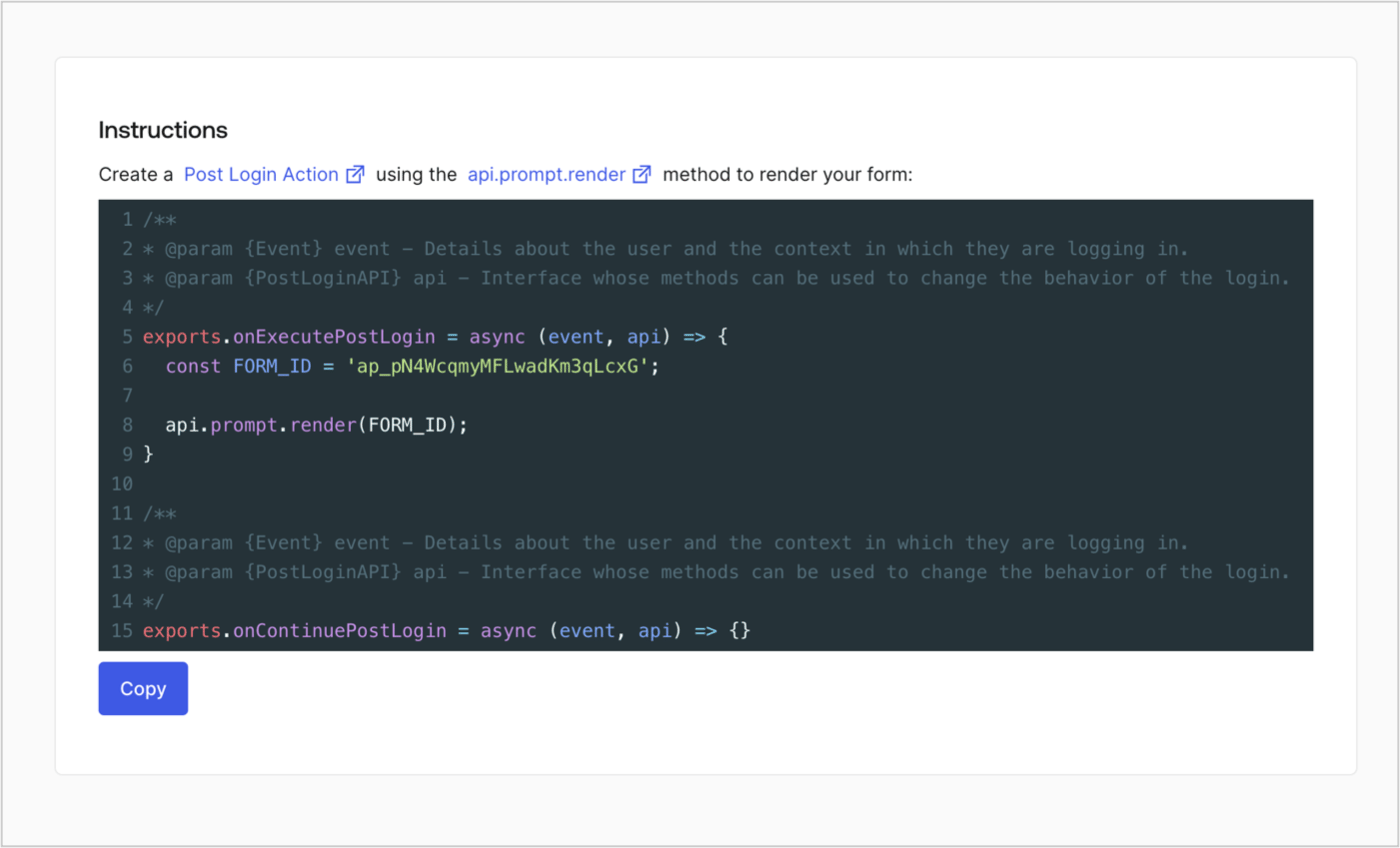
Retrieve your form render code to visually render the form with a custom Post Login Action by following these steps:

* From the Form editor, select **`<> Render`**.
* Select **Copy**.
<Frame>
  <img src="https://mintcdn.com/docs-dev-feat-3p-app-cross-app/incsyWvpqtVjEku-/docs/images/cdy7uua7fh8z/2EIUzc539sq9lwoTKbjoJv/496a864c0fc44a782c9cadca119dbfb0/embed.png?fit=max&auto=format&n=incsyWvpqtVjEku-&q=85&s=6c5e1763035d5cbbd4a29e13369a02d7" alt="Dashboard > Actions > Forms > Form > Embed" data-og-width="1400" width="1400" data-og-height="848" height="848" data-path="docs/images/cdy7uua7fh8z/2EIUzc539sq9lwoTKbjoJv/496a864c0fc44a782c9cadca119dbfb0/embed.png" data-optimize="true" data-opv="3" srcset="https://mintcdn.com/docs-dev-feat-3p-app-cross-app/incsyWvpqtVjEku-/docs/images/cdy7uua7fh8z/2EIUzc539sq9lwoTKbjoJv/496a864c0fc44a782c9cadca119dbfb0/embed.png?w=280&fit=max&auto=format&n=incsyWvpqtVjEku-&q=85&s=c80917557b70958dc41e831f9e1ed6f5 280w, https://mintcdn.com/docs-dev-feat-3p-app-cross-app/incsyWvpqtVjEku-/docs/images/cdy7uua7fh8z/2EIUzc539sq9lwoTKbjoJv/496a864c0fc44a782c9cadca119dbfb0/embed.png?w=560&fit=max&auto=format&n=incsyWvpqtVjEku-&q=85&s=4c58d5ea459bf98f25610177a669c77c 560w, https://mintcdn.com/docs-dev-feat-3p-app-cross-app/incsyWvpqtVjEku-/docs/images/cdy7uua7fh8z/2EIUzc539sq9lwoTKbjoJv/496a864c0fc44a782c9cadca119dbfb0/embed.png?w=840&fit=max&auto=format&n=incsyWvpqtVjEku-&q=85&s=420dee0f27dba51f80a0f606fa90b6ac 840w, https://mintcdn.com/docs-dev-feat-3p-app-cross-app/incsyWvpqtVjEku-/docs/images/cdy7uua7fh8z/2EIUzc539sq9lwoTKbjoJv/496a864c0fc44a782c9cadca119dbfb0/embed.png?w=1100&fit=max&auto=format&n=incsyWvpqtVjEku-&q=85&s=6aeee26aa06badb94cd8a7a68b9f11fe 1100w, https://mintcdn.com/docs-dev-feat-3p-app-cross-app/incsyWvpqtVjEku-/docs/images/cdy7uua7fh8z/2EIUzc539sq9lwoTKbjoJv/496a864c0fc44a782c9cadca119dbfb0/embed.png?w=1650&fit=max&auto=format&n=incsyWvpqtVjEku-&q=85&s=901f28f2f5741ece4811b68e1c87c1c2 1650w, https://mintcdn.com/docs-dev-feat-3p-app-cross-app/incsyWvpqtVjEku-/docs/images/cdy7uua7fh8z/2EIUzc539sq9lwoTKbjoJv/496a864c0fc44a782c9cadca119dbfb0/embed.png?w=2500&fit=max&auto=format&n=incsyWvpqtVjEku-&q=85&s=0918c498856c517c992bab5ac3a070fe 2500w" />
</Frame>

## Create a Post Login Action

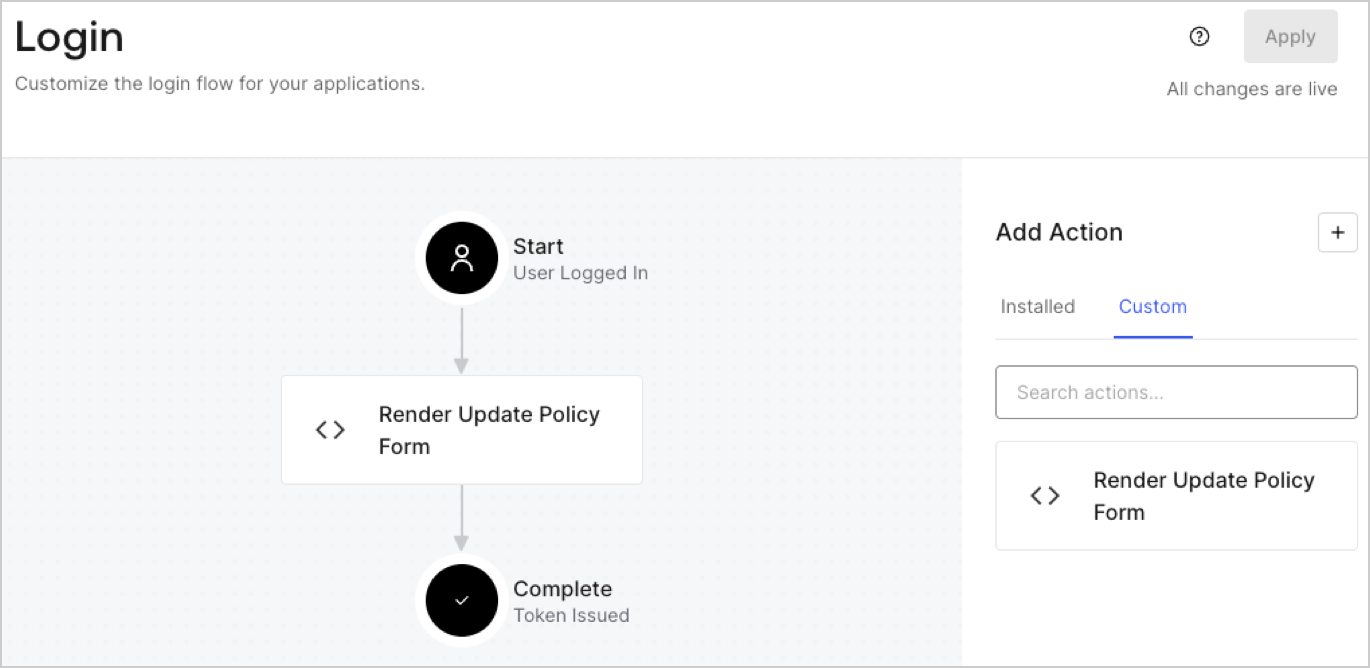
Create a post-login Action to render your form by following these steps:

1. Navigate to **Auth0 Dashboard > Actions > Flows > Login.**
2. Select the **+** icon and Select **Build from scratch**:

   * **Name**: Enter `Render Update Policy Form`.
   * **Trigger**: Select `Login / Post Login`.
   * **Runtime**: Select the recommended version.
3. Select **Create**.

To configure the post-login Action:

1. Delete the existing code from the Code editor.
2. Paste the form render code into the Code editor.
3. Edit the code to define the conditional logic that will render the form.

   ```javascript lines theme={null}
   /**
   * @param {Event} event - Details about the user and the context in which they are logging in.
   * @param {PostLoginAPI} api - Interface whose methods can be used to change the behavior of the login.
   */
   exports.onExecutePostLogin = async (event, api) => {
     const FORM_ID = 'REPLACE_WITH_YOUR_FORM_ID';

     if (event.user.app_metadata.privacy_policies !== true) {
       api.prompt.render(FORM_ID);
     }
   }

   exports.onContinuePostLogin = async (event, api) => { }
   ```

   <Callout icon="file-lines" color="#0EA5E9" iconType="regular">
     The example code above will render the form when a user is missing the app metadata `privacy_policies` property.
   </Callout>
4. Select **Deploy.**
5. Drag and Drop the **Render Update Policy Form** Action to the **Login** flow.
   <Frame>
     <img src="https://mintcdn.com/docs-dev-feat-3p-app-cross-app/KCLWWwpjX2i1oQRe/docs/images/cdy7uua7fh8z/5TOwDgevZsBqd7yZynUYWU/41ca909dc3007aed4f40ff794a05efa5/postlogin.png?fit=max&auto=format&n=KCLWWwpjX2i1oQRe&q=85&s=0c6ab235b078d0dbde33936c52250b9d" alt="Dashboard > Forms > Use Case > Render update policy form login action" data-og-width="1370" width="1370" data-og-height="668" height="668" data-path="docs/images/cdy7uua7fh8z/5TOwDgevZsBqd7yZynUYWU/41ca909dc3007aed4f40ff794a05efa5/postlogin.png" data-optimize="true" data-opv="3" srcset="https://mintcdn.com/docs-dev-feat-3p-app-cross-app/KCLWWwpjX2i1oQRe/docs/images/cdy7uua7fh8z/5TOwDgevZsBqd7yZynUYWU/41ca909dc3007aed4f40ff794a05efa5/postlogin.png?w=280&fit=max&auto=format&n=KCLWWwpjX2i1oQRe&q=85&s=0301fb2aca166dde4dfd1fc0ebbc7f04 280w, https://mintcdn.com/docs-dev-feat-3p-app-cross-app/KCLWWwpjX2i1oQRe/docs/images/cdy7uua7fh8z/5TOwDgevZsBqd7yZynUYWU/41ca909dc3007aed4f40ff794a05efa5/postlogin.png?w=560&fit=max&auto=format&n=KCLWWwpjX2i1oQRe&q=85&s=05f8088aac8696e3d6e6d6fd1a4efce0 560w, https://mintcdn.com/docs-dev-feat-3p-app-cross-app/KCLWWwpjX2i1oQRe/docs/images/cdy7uua7fh8z/5TOwDgevZsBqd7yZynUYWU/41ca909dc3007aed4f40ff794a05efa5/postlogin.png?w=840&fit=max&auto=format&n=KCLWWwpjX2i1oQRe&q=85&s=8ba0b06cbaa87b0b3031e836353876c8 840w, https://mintcdn.com/docs-dev-feat-3p-app-cross-app/KCLWWwpjX2i1oQRe/docs/images/cdy7uua7fh8z/5TOwDgevZsBqd7yZynUYWU/41ca909dc3007aed4f40ff794a05efa5/postlogin.png?w=1100&fit=max&auto=format&n=KCLWWwpjX2i1oQRe&q=85&s=50995ffb273a3bd4386637acbc97aba9 1100w, https://mintcdn.com/docs-dev-feat-3p-app-cross-app/KCLWWwpjX2i1oQRe/docs/images/cdy7uua7fh8z/5TOwDgevZsBqd7yZynUYWU/41ca909dc3007aed4f40ff794a05efa5/postlogin.png?w=1650&fit=max&auto=format&n=KCLWWwpjX2i1oQRe&q=85&s=8d797d5e15d916941ccc865bfeefb134 1650w, https://mintcdn.com/docs-dev-feat-3p-app-cross-app/KCLWWwpjX2i1oQRe/docs/images/cdy7uua7fh8z/5TOwDgevZsBqd7yZynUYWU/41ca909dc3007aed4f40ff794a05efa5/postlogin.png?w=2500&fit=max&auto=format&n=KCLWWwpjX2i1oQRe&q=85&s=e835f5fea75e14366a4040e01f283fb6 2500w" />
   </Frame>
6. Select **Apply.**

### Test implementation

Test the implementation by following these steps:

1. Log in with an existing user whose app`_metadata` attribute `privacy_policies` does not have a value.
2. The post-login Action in the Login flow will render the form and prompt for acceptance.
3. Select **Auth0 Dashboard > User Management > Users,** locate the user and verify that the `app_metadata` attribute `privacy_policies` contains a `true` value and a timestamp.
